When creating a policy rule, there is an option to log the session at session start, session end, both or none. Two terms will show up in the logs that are easily confused
- Session start time - time at which the session started
- Receive time - time at which the log processor received the log information
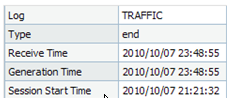
In the example below, the session itself began at Session Start Time: 21:21. Generation Time is when the
logger received the logged session information at the end of the session at 23:48, and Receive Time is the
logging time stamp.
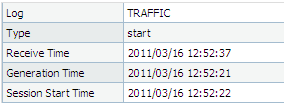
When logging at session start, the time stamps will be much closer together.
Specific information regarding the timers is provided below:
Start Time: The timestamp when the session was created on the dataplane.
Elapsed Time: Session duration in seconds since
Start Time.
Elapsed Time is a direct measurement of session duration by the Data Plane's session table and is an independent counter, not a calculated field based on Generate Time or Receive Time. Sessions with very short durations (sub-second) or those with no actual data traffic before termination or aging out will report an Elapsed Time of 0Generate Time: The timestamp is printed in the DP when the log gets generated but this value is overwritten by logrcvr on MP when it receives the log (see note below for further details). On a firewall log, therefore, the
Generated Time and
Receive Time is the same. On Panorama/DLC, these values can be different because the
Generated Time is populated by the firewall’s logrcvr while
Receive Time is populated by logd on Panorama/DLC.
Time Logged: (Deprecated)
Receive Time: The timestamp when the writing entity receives the log. On a firewall log, this timestamp is populated by the logrcvr. On Panorama or Dedicated Log Collector, this timestamp populated by the logd process.
Note: The reason that MP overwrites the “Generated Time” is because DP and MP’s times are not always synchronized. Even though they both use NTP their clocks can differ by a second or more. This has led to cases where the “Time Generated” field was ahead of the “Receive Time” field, and this has been challenging to explain to customers.
Additionally, sessions that time out due to lack of activity (as opposed to FIN/RST) will have the session timeout as a factor in determining the variance between the total/elapsed/etc log times.
In the logging example below, a 3600 second idle timeout value is set:
Session start: 22:12:04
Log Generation: 00:56:40
Elapsed time: 6276
Session Start - Log Generation = 2 hours, 44 minutes, 36 seconds (9876 seconds)
Discrepancy between Elapsed time & actual time: 3600 seconds
Based upon this log the session went idle and timed out after 3600 seconds. So the elapsed time when the session was active was 6276 seconds. The log was generated when the session timed out.
Note: If a firewall loses connectivity to Panorama, or if the Panorama server was offline for a period of time,
it is possible that there will be a time difference between Generate Time and Time logged. If something was
logged at 1pm for example on the firewall but the Panorama server came back online at 2pm, the log will show
a Generate Time of 1pm but Time Logged will be 2pm.