How to address CVE-1999-0524 detected on Palo Alto Networks firewalls
40191
Created On 05/03/23 14:00 PM - Last Modified 10/24/25 07:45 AM
Objective
- Remediate CVE-1999-0524 detected through vulnerability scan of Palo Alto Networks firewalls
Environment
- PAN-OS Firewalls
- All supported versions
- CVE-1999-0524 showing on vulnerability scan
Procedure
- Create a custom application for ICMP types 13 and 14
1. Go to Objects -> Applications -> Add
2. Give a name and description and select the other properties as desired
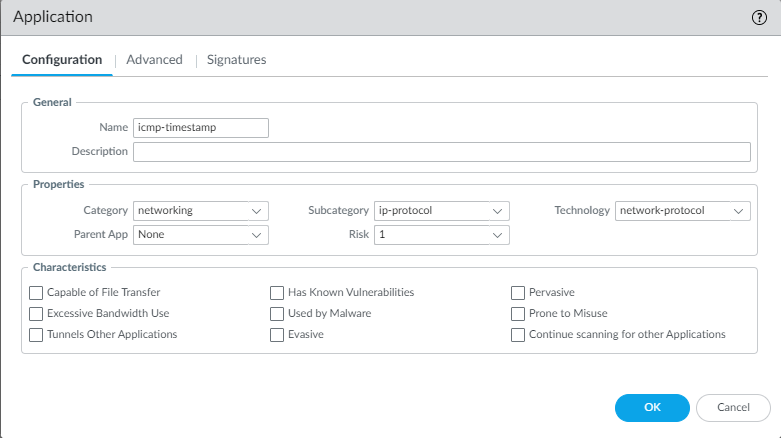
3. Click on Advanced tab and select 'ICMP Type', enter "13,14"
4. Add a custom signature in the signatures tab
- Click on > ADD or Condition
- Add the below values:
- Operator: Equal To
- Context: icmp-req-type
- Value: 13
5. Click OK
- Create a new security policy with the custom application and set the action to deny
Additional Information
To verify you can utilize a third party software such as hping3 to send a timestamp request.
Example showing timestamp request completing successfully:
After adding the custom application and a deny security policy, these will be unsuccessful:
Checking the traffic log on the firewall will show the same.
Also see article on how to Allow/Deny a certain ICMP type .