User ID Agent frequently crashes with logs "st->buf[st->index], sizeof(st->buf[st->index])"
5225
Created On 10/13/22 07:48 AM - Last Modified 05/03/24 20:27 PM
Symptom
- UaService.exe crashes frequently and a log is generated on the Event Logs of Domain Server.
- Loss of connectivity between firewall and UIA reported with firewall unable to fetch mappings.
- UIA agent logs (Logs found in "C:\Program Files (x86)\Palo Alto Networks\User-ID Agent" with file names are "UaDebug" and UaDebugOld")
:192[Error 618]: st->buf[st->index], sizeof(st->buf[st->index]))() failed
:192[Error 3905]: Device thread 3 failed to compose msg. error -17
:299[ Info 1416]: group query succeeded on jobid 1061. xxxxx groups. took 88 sec. >>>> Fetching Group's as LDAP Proxy
:123[Error 618]: st->buf[st->index], sizeof(st->buf[st->index]))() failed >>>> Causing crash.
:123[Error 3905]: Device thread 7 failed to compose msg. error -17
- System logs (show log system)
03:55:49 high  userid  user-gr 0  User Group count of XXXXX exceeds threshold of 10000  >>>> Fetching Group's
03:55:56 high  userid  connect 0  User-ID Agent Agent-Name (vsys1): Error: Failed to Connect to X.X.X.252(source: X.X.X.254), SSL error: error:00000000:lib(0):func(0):reason(0)(5)  details: none
-
Event Viewer on Windows:
The User-ID Agent service terminated unexpectedly. It has done this 1 time(s). The following corrective action will be taken in 60000 milliseconds: Restart the service.
-
High RAM utilization is seen for UIA process.
Environment
- User ID Agent (UIA)
- Windows Domain Server
- LDAP Proxy
Cause
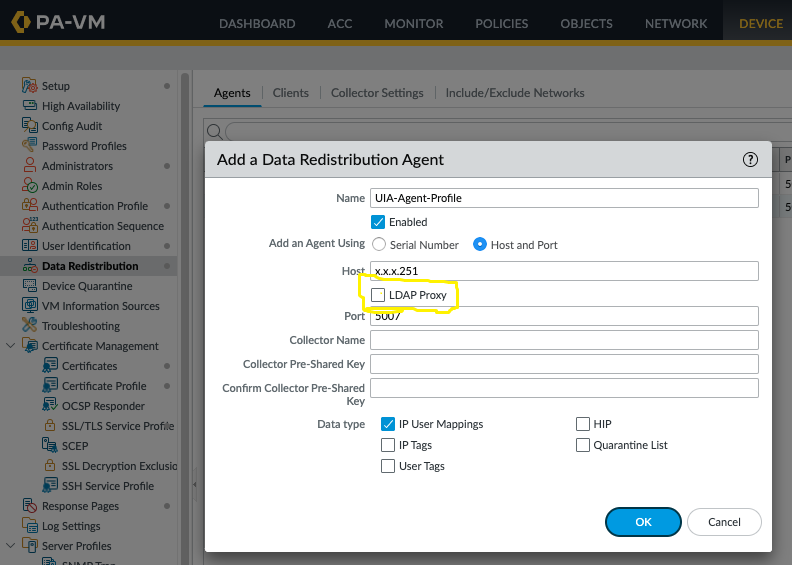
- LDAP Proxy is enabled on the firewall UIA configuration.
- When LDAP Proxy is enabled, UIA is responsible to fetch the Group-Mappings.
- With high number of LDAP groups and/or IP-user mappings, this configuration causes high memory usage of the UAService.exe process leading to a crash.
Resolution
- Disable LDAP Proxy
- Commit the configuration.
- If LDAP Proxy has to be enabled, reduce the number of groups and users or have the Firewall fetching groups directly with include group list to reduce the memory usage.
GUI: Device > Data Redistribution > Agents > (Agent name) > LDAP Proxy