Few GlobalProtect Gateways are not visible in the Gateway list under GlobalProtect App
10486
Created On 04/20/23 11:31 AM - Last Modified 09/29/23 00:12 AM
Symptom
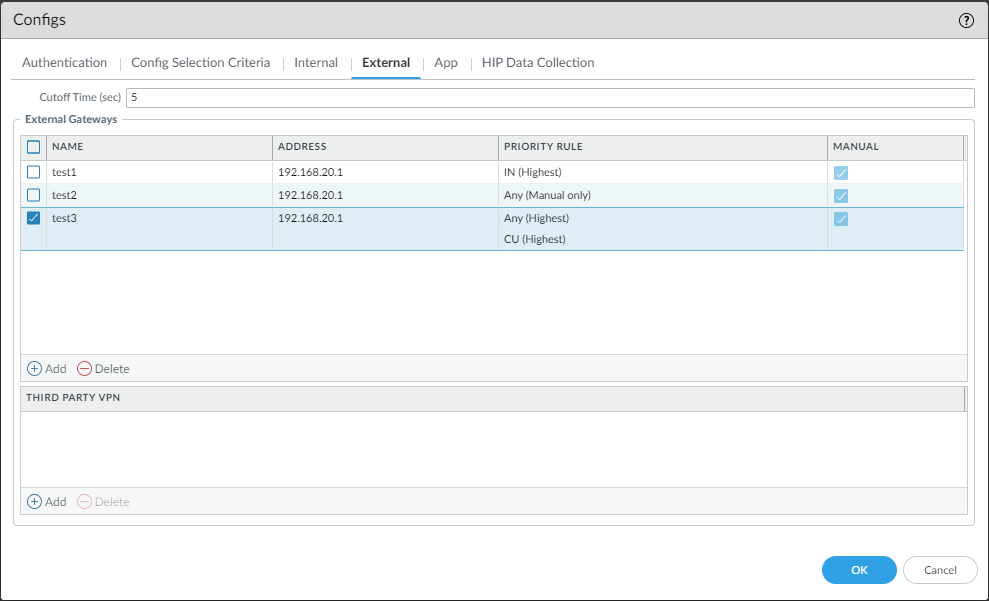
- Multiple Gateways are configured under GUI: Network > GlobalProtect >Portals > (portal name) > Agent > (Agent name) > Configs > External
- In the example below, gateway list configured as: test1, test2 and test3
;
- In the GlobalProtect Status Panel shown below, when clicking on the gateway list, only two gateways are visible (test2 and test3).
- PanGPA.log (GP client logs) indicates Portal presenting all the 3 Gateways to the Client with different priorities.
- On the GlobalProtect App, test1 gateway is missing from the list.
Environment
- Palo Alto Firewalls
- PAN-OS 9.1 and above
- GlobalProtect (GP) App
- GlobalProtect Portal
Cause
- The visibility of the gateway in the GP App's gateway list is determined by the priority assigned to the gateway.
- From the snapshot below, Gateway 'test1' is configured for country "IN" (source region "ANY" is not configured).
- If "ANY" is not defined as the source region in the gateways( test1), the priority will be set to "-2" by default.
- The gateway which has been assigned with priority "-2" will not be visible in the gateway selection list.
GUI: Network > GlobalProtect >Portals > (portal name) > Agent > (Agent name) > Configs > External
Resolution
- Change the "source region" of "test1" to "ANY". Refer to the details below.
- By default, the user gets connected to the gateway which has "Highest" priority and source region set to "ANY".
- If the gateway's source region is set to "ANY" and priority is set to "Manual Only" the priority"0" will be allotted to that gateway.
- Below are the numerical priorities assigned to the gateways.
| Source Region | Priority | Numerical Priority Assigned |
| Only Country | Manual-Only Highest High Medium Low Lowest | -2 |
| ANY | Manual-Only | 0 |
| ANY | Highest | 1 |
| ANY | High | 2 |
| ANY | Medium | 3 |
| ANY | Low | 4 |
| ANY | Lowest | 5 |
Additional Information
- Here the portal configuration is changed to have "Any" to the gateway "test1"
- Now test1 Gateway is also visible in the GP Client Application.