Why Logs are not forwarded to Strata Cloud Manager after enabling default route advertisement on Service Connections
Symptom
The following is logged in logrcvr.log
2024-11-28 13:43:12.227 -0500 Error:  pan_mgmt_secure_conn_ocsp_crl_check(pan_sec_conn_client.c:273): [Secure conn cert verify stage] cert[CN: *.lcaas.prod.ca1.cs.paloaltonetworks.com] revoked, not valid!
2024-11-28 13:43:12.227 -0500 Error:  pan_sec_conn_client_validation_impl(pan_sec_conn_client.c:465): [Secure conn] Failed to verify OCSP/CRL for the certificate.
2024-11-28 13:43:12.227 -0500 Error:  pan_mgmt_peer_validation(pan_sec_conn_client.c:839): Peer validation for server[34.95.13.92] failed
2024-11-28 13:43:12.227 -0500 Error:  pan_conn_mgr_do_connect(cs_conn.c:12959): Untrusted LCaaS cert detected, Error connecting to LCaaS
Also the output of the of the command below shows SSL failure
> request log-collector-forwarding status
SSL :
msg : SSL connect retry. sslerr=2
status : failure
timestamp : 2024/11/28 13:43:12
Environment
Prisma Access
Cause
Advertising the default route from the SC in Prisma causes the creation of a second virtual router called VR1.
This then causes the move of loopback.1 interface to the new virtual router.
The Prisma nodes use a service route over loopback.1 for OCSP/CRL validation
crl-status {
                source {
                  address <address ommited>;
                  interface loopback.1;
As a result this traffic is now forwarded to the SCs and eventually to an on prem firewall and not to the internet over ethernet1/1 .
If this traffic is not specifically allowed it breaks the communication with the OCSP/CRL server and as a result ssl tunnel establishment with the Logging Server is not possible.
Resolution
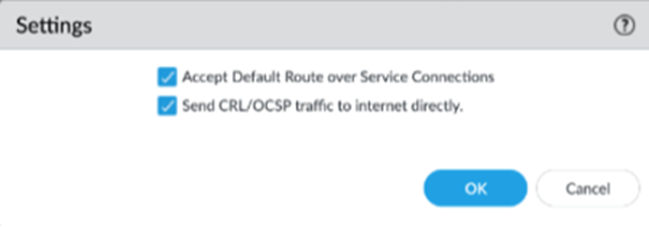
To overcome this from SCM > Workflows > Prisma Access Setup > Service Connections > Advanced Settings we enabled Send CRL/OCSP traffic to internet directly
From Panorama >Cloud Services > Configuration > Traffic Steering