How to block adware sites and prevent user(s) from accidental credential submission
14409
Created On 08/28/20 18:19 PM - Last Modified 08/24/23 14:32 PM
Objective
This configuration provides steps involved in blocking the adware, Grayware sites by the DNS security. Also, prevent users from accidentally submitting their credentials to phishing sites.
Environment
All PAN-OS
Procedure
Starting PAN-OS 10.0 release new DNS security categories was introduce, Grayware. This new category can be configured to block.
Note: If you want to know more about the Grayware category, please check the live community at:- https://live.paloaltonetworks.com/t5/blogs/new-dns-security-category-grayware/ba-p/341539
- Through DNS security configuration:
If you have a DNS security license and it is enabled, you can find the Grayware configuration at the Anti-Spyware profile. The default action for the Grayware category is blocked, severity is medium and packet capture is disabled. You can change any of these actions. Please note, DNS security will block on the DNS name resolution level. 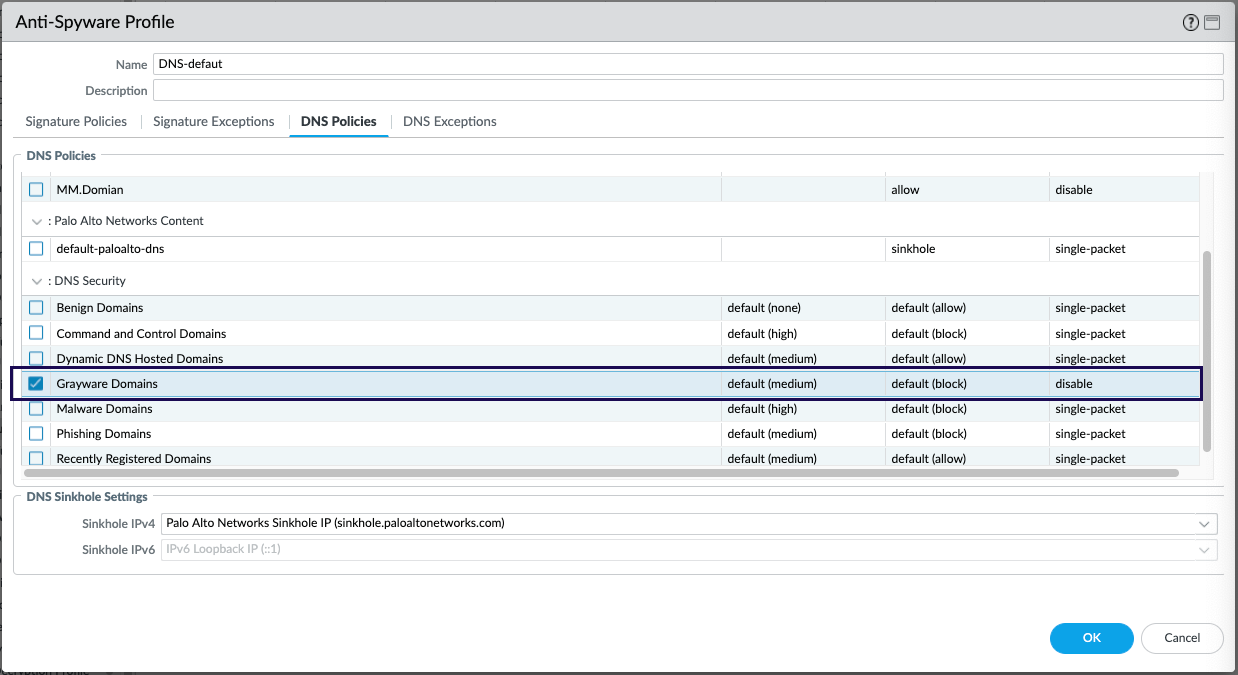
- Through URL filtering :
Another way to block the Grayware category is through the URL category. You can go to profile->URL filtering -> select the Grayware and change the default action as display in the following figure. In the URL filtering, you can also apply the configuration to block the user credential submission.