Panorama authorization/restriction for administrator access using SAML 2.0 and Access Domain (AD) enforcement
17630
Created On 05/06/22 07:28 AM - Last Modified 05/26/22 02:26 AM
Objective
In an environment like Security Managed services, you'll leverage a single Panorama to manage multiple customers' firewalls. This article will answer the challenge of providing each customer access to the Device Groups and Templates that they own and should hide other customer resources.
You will be configuring SAML2.0, and in this article, we'll be using Okta as an example which will control the Access Domain that users can access. For more info about Access Domain, click here .
As for the Panorama part, you'll need to configure the Access Domains that map to their respective Device Groups and Templates.
Environment
- Panorama 9.1.x and above
- SAML2.0
Procedure
Panorama Configuration
1. Configure the Access Domain with its Device Group and Template from Panorama > Access Domain, and the result is as below.
2. Verify that the Panorama admin role for saml-ar is as below; go to Panorama > Admin Roles
3. Configure the Administrator to authenticate against the SAML authentication profile, Panorama > Administrator
Okta Configuration
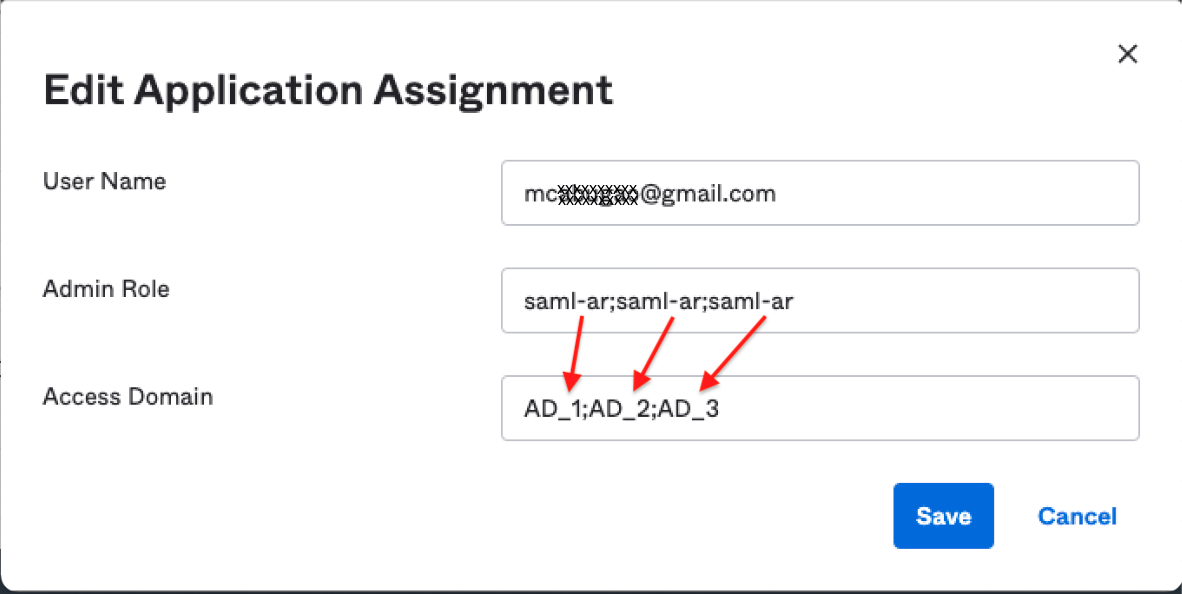
1. Assign the user with the appropriate Admin Role and Access Domain; in our example, AD_1, AD_2, AD_3 will be accessible to the user; go to Directory > People > [click the username] > Palo Alto Network - Admin UI > click the pencil sign, which is the edit.
You will need to use a semi-colon as the separator for each Admin Role and Access Domain value,
and each Admin Role will have its corresponding Access Domain and vice-versa.
Result
1. Login to your Panorama using your SAML2.0 credential, and verify the Access Domains granted to you as shown below.
2. Sample output of authd.log
2022-05-06 13:59:38.118 +1000 debug: add_info_from_auth_profile_to_request(pan_auth_util.c:1045): MFA is not configured for the auth profile. No mfa server ids for the user "mcxxxxx@gmail.com" (prof/vsys: jico-SAML-test/shared)
2022-05-06 13:59:38.118 +1000 debug: pan_auth_allowlist_response_process(pan_auth_state_engine.c:3842): added b_mfa = 0 with 0 factors for SAML authentication request
2022-05-06 13:59:38.118 +1000 debug: pan_auth_send_saml_resp(pan_auth_server.c:1093): Succeed to cache role/adomain saml-ar;saml-ar;saml-ar/AD_1;AD_2;AD_3 for user mcxxxxxx@gmail.com
2022-05-06 13:59:38.118 +1000 SAML SSO authenticated for user 'mcxxxxx@gmail.com'.   auth profile 'jico-SAML-test', vsys 'shared', server profile 'OKTA-using-metadata', IdP entityID 'http://www.okta.com/exk2fojop0CIEYXk45d7', admin role 'saml-ar;saml-ar;saml-ar', access domain 'AD_1;AD_2;AD_3', From: 10.47.115.3.
2022-05-06 13:59:38.118 +1000 debug: _log_saml_respone(pan_auth_server.c:348): Sent PAN_AUTH_SUCCESS SAML response:(authd_id: 7042101092317934609) (return username 'mcxxxxx@gmail.com') (auth profile 'jico-SAML-test') (NameID 'mcxxxxx@gmail.com') (SessionIndex '_dc83a3
e72c60c1b5e2ca8e5c61436b7d') (Single Logout enabled? 'No')
2022-05-06 13:59:38.172 +1000 debug: pan_auth_request_process(pan_auth_state_engine.c:3375): Receive request: msg type PAN_AUTH_REQ_GROUP, conv id 2123, body length 32
2022-05-06 13:59:38.172 +1000 debug: pan_db_funcs_request_process(pan_auth_state_engine.c:1577): init'ing group request (authorization)
2022-05-06 13:59:38.172 +1000 debug: pan_authd_handle_group_req(pan_auth_state_engine.c:1418): start to authorize user "mcxxxxx@gmail.com"
2022-05-06 13:59:38.172 +1000 debug: pan_auth_mgr_get_userinfo(pan_auth_mgr.c:1837): Found userinfo (name/role/ado) cache entry: mcxxxxx/saml-ar;saml-ar;saml-ar/AD_1;AD_2;AD_3
Additional Information
Introduction to SAML
How to Configure SAML 2.0 for Palo Alto Networks - Admin UI