Access to a specific site failing with decryption errors "TLS Handshake Failure. Received fatal alert HandshakeFailure from server"
92326
Created On 04/14/22 09:05 AM - Last Modified 04/03/26 07:44 AM
Symptom
- A specific website is not accessible when the traffic is subject to SSL decryption.
- The same site is accessible if bypassed via SSL decryption.
- There is no specific browser error message except "This site can't be reached"
- The decryption logs show "TLS handshake failure. Received Fatal Alert Handshake failure from Server".
Environment
- Prisma Access with SSL decryption enabled.
- Strata NGFW running or above with SSL decryption enabled.
- PAN-OS 10.0.
Cause
- This issue happens when the server doesn't support a specific cipher suite or a TLS parameter sent in Client Hello packet.
- The Palo Alto SSL decryption cipher control is done via SSL forward proxy decryption profile. The Client Hello sent by the browser is modified and only ciphers enabled in the decryption profile are sent to the server.
- In few cases, some servers may support only older cipher types and if they are not enabled in the SSL forward proxy decryption profile, the server will reject the Client Hello resulting in this situation and generate the log "Received fatal alert HandshakeFailure from server"
Resolution
- Identify the cipher suite supported by the server from a working TLS handshake capture. (Refer Packet Capture KB )
- Enable that cipher parameter in the SSL forward proxy decryption profile (GUI: Objects > Decryption > Decryption Profile > (name) >SSH Decryption > SSL Protocol Settings)
- Alternatively, create a no decrypt rule for the specific URL to bypass it from SSL decryption if the company policy does not allow it to enable older cipher parameters.
Additional Information
Steps to isolate and identify the problem:
- Perform the captures on the Prisma Access or Strata NGFW to find the handshake failure details. (Note:- For Prisma Access the captures can only be done by TAC)
- The captures show TLS handshake failure from the Server side.
- Perform a packet capture on the client machine in working condition.
- This can be done by bypassing the client from the NGFW/Prisma Access path or bypassing the URL from decryption.
- Check the Server Hello portion of the packet and note down the Cipher suite selected by the server.
- This information can be used to check if all the parameters in the server accepted cipher suite are enabled in SSL forward proxy decryption profile and find the missing parameter.
- Now, analyse the previous captures again to see the Client Hello. Check the list of cipher suite which does Not include the cipher suite accepted by the server.
- It is clearly visible that the cipher suite supported and accepted by the server is not sent as part of client hello, Hence the handshake failure is expected.
- Check the SSL forward proxy decryption profile associated with the decryption rule to see SHA1 authentication algorithm is unchecked.
GUI: Objects > Decryption > Decryption Profile > (name) >SSH Decryption > SSL Protocol Settings
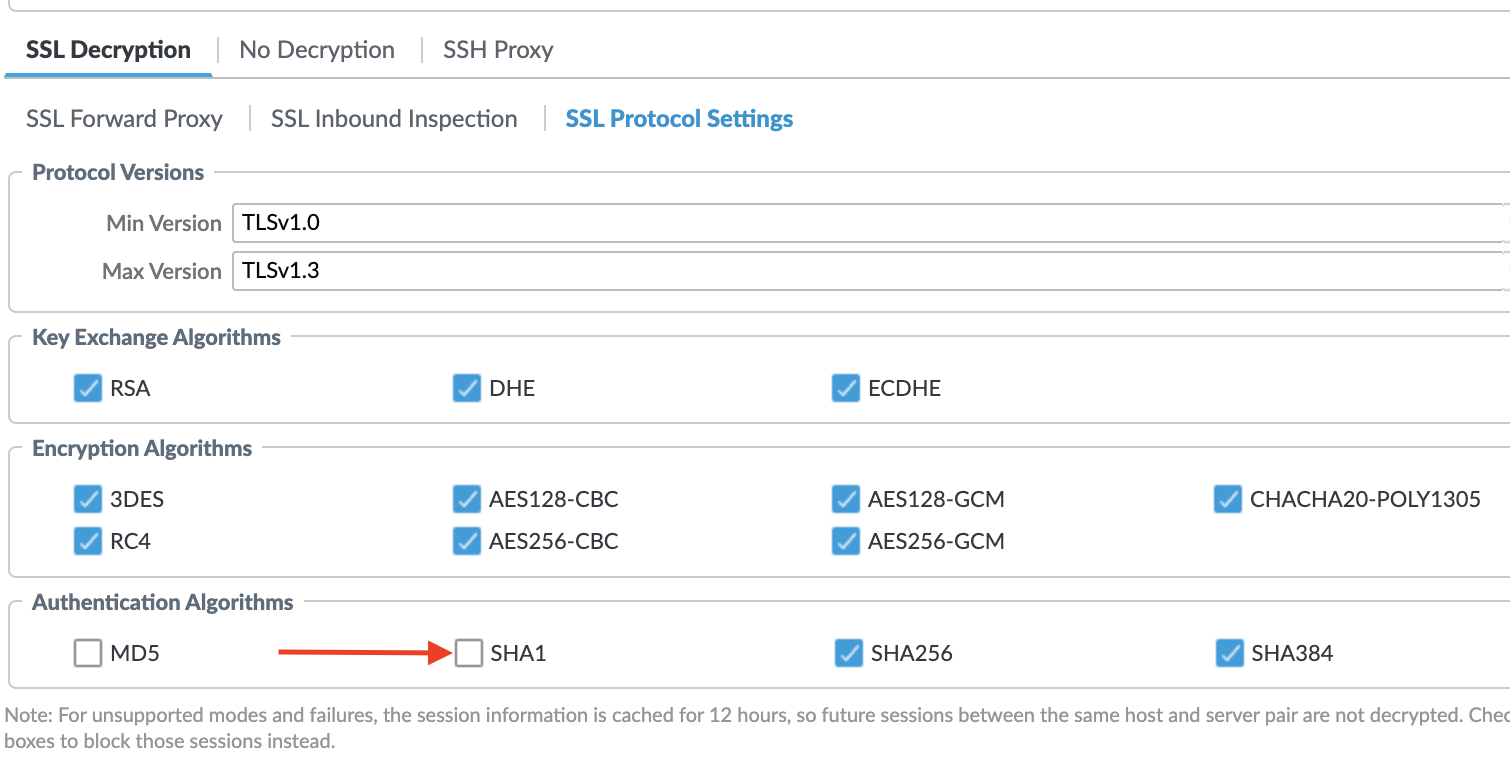
- This is the reason, the Cipher suite TLS_ECDHE_RSA_WITH_AES_128_CBC_SHA is not sent during SSL decryption.
- Enabling SHA1 in this forward proxy decryption profile will fix the issue here.
- The same steps can be applied to identify any other parameter not enabled in the SSL forward proxy decryption profile and causing an issue with the TLS handshake.
- Refer SSL Forward Proxy Decryption Profile for information SSL forward proxy decryption profile
Refer Similar article: How to Identify Root Cause for SSL decryption failures