Error message "Management Group "eeac4911-af4c-4463-b3a5-9fec09ca96c3" was not found" on Prisma Cloud
13626
Created On 11/02/21 18:48 PM - Last Modified 10/12/26 20:40 PM
Symptom
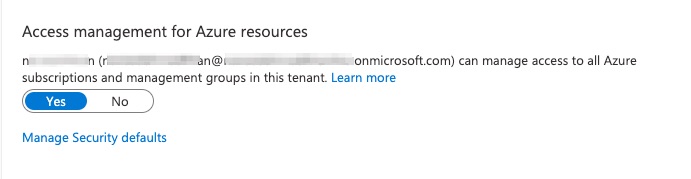
The error 'Management Group "eeac4911-af4c-4463-b3a5-9fec09ca96c3" was not found' in Azure occurs if the 'Access management for Azure resources' is OFF in Azure Default Directory.
Note: Customer's Management Group ID "eeac4911-af4c-4463-b3a5-9fec09ca96c3" will be different with this example.
Environment
- Prisma Cloud
- Microsoft Azure
Cause
Access management for Azure resources is OFF in Azure Portal.
Resolution
Microsoft Azure Portal:
1. Log in to Azure Portal.
2. Type Microsoft Entra ID in Search bar. Then click on Microsoft Entra ID.
3. Click on Properties under Manage.
4. Select Yes in Access management for Azure resources and click Save.
5. Now perform Connect your Azure Tenant
4. Select Yes in Access management for Azure resources and click Save.
5. Now perform Connect your Azure Tenant