Prisma Cloud Compute registry scan error - x509: certificate signed by unknown authority on Openshift 4.x
Symptom
- What is the registry?
Prisma Cloud can scan container images in both public and private repositories on both public and private registries.
The registry is a system for storing and distributing container images. The most well-known public registry is Docker Hub, although there are also registries from Amazon, Google, and others. Organizations can also set up their own internal private registries. Prisma Cloud can scan container images on all of these types of registries.
From more information on registry here.
- Where to configure the registry: Console(UI) defender > Vulnerability > Images > Registry settings > Add registry and fill out the information.
3. Why is the scan being done on the registry:
Identify and prevent vulnerabilities across the entire application lifecycle while prioritizing risk for your cloud native environments. Integrate vulnerability management into any CI process, while continuously monitoring, identifying, and preventing risks to all the hosts, images, and functions in your environment. Prisma Cloud combines vulnerability detection with an always up-to-date threat feed and knowledge about your runtime deployments to prioritize risks specifically for your environment.
for more information on registry scan here.
Registry scan fails with the following error message:
Alert message: <screenshot from UI>:
Environment
- PANW v. 21.04.412
Deployment - On-prem - Environment:
Which edition and version of Compute (if SaaS, provide path to Console): 21.04.421 - Environment: Openshift v 4.6
Docker version: OS uses CRIO instead of Docker.
Host OS version: CoreOS Red Hat Enterprise Linux CoreOS 47.83.202104161442-0 (Ootpa) OS release 4.7
Orchestrator version: CRIO
Cause
- To debug further check the defender logs here:
2. Defender.log location: <location from the UI>:
OUTPUT from the defender.log file:Failed to pull image testimage:latest, error Error initializing source docker://registry.example.com:9305/testimage:latest: error pinging docker registry registry.example.com:9305: Get "https://registry.example.com:9305/v2/": x509: certificate signed by unknown
3. Reason why it failed on CRIO(Container Run) (Openshift 4.x):
What is CRIO?
CRI-O is an implementation of the Kubernetes CRI (Container Runtime Interface) to enable using OCI (Open Container Initiative) compatible runtimes. It is a lightweight alternative to using Docker as the runtime for kubernetes. ... It is a lightweight alternative to using Docker, Moby or rkt as the runtime for Kubernetes.
For more information here.
Both reason 1 and 2 should be applied to the HOST where defenders is deployed.
Reason 1:
Errors occurs when HOST does not fine the following 3 files under the directory name: /etc/conainters/certs.d/<registryname:port>/
- Private key
- Host cert
- CA chain
Resolution
Solution 1
- Create directory "/etc/containers/certs.d" on OS 4.x host
- create a new subdirectory with <registryname:port> e.g. "1182419.registry.com:9305"
- copy and paste 3 files from /etc/containers/certs.d directory:
- private key
- Host cert
- CA chain
- to the newly subdirectory "1182419.registry.com:9305"
Then start a 'registry scan' again from UI which resolved the issue.
Solution 2
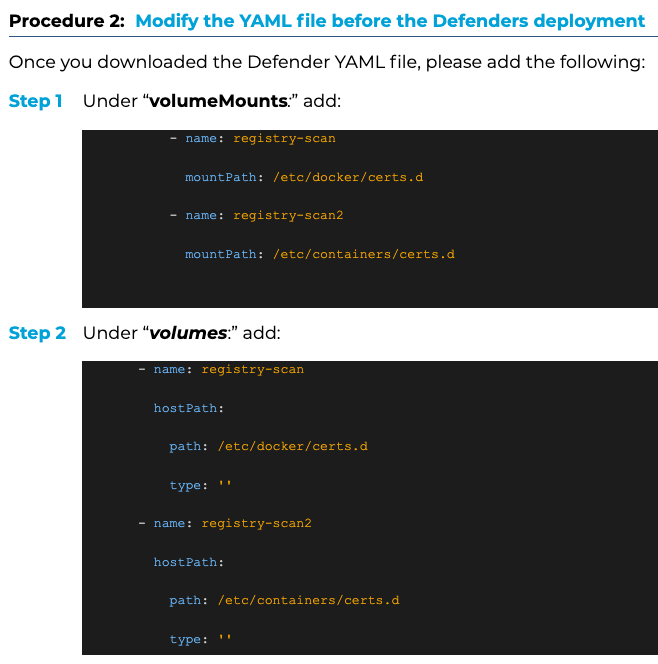
Save and exit the above file and run following command: