User gets connected to newly deployed GP Portal without credential prompt
7021
Created On 03/24/21 08:24 AM - Last Modified 06/07/24 21:12 PM
Symptom
- Client is connected to Portal GP1:
- Portal is switched to GP2, the same user is able to connect to GP2 without being prompted for password:
Environment
- Palo Alto Firewalls
- Supported PAN-OS
- GlobalProtect (GP) Portal with similar authentication settings
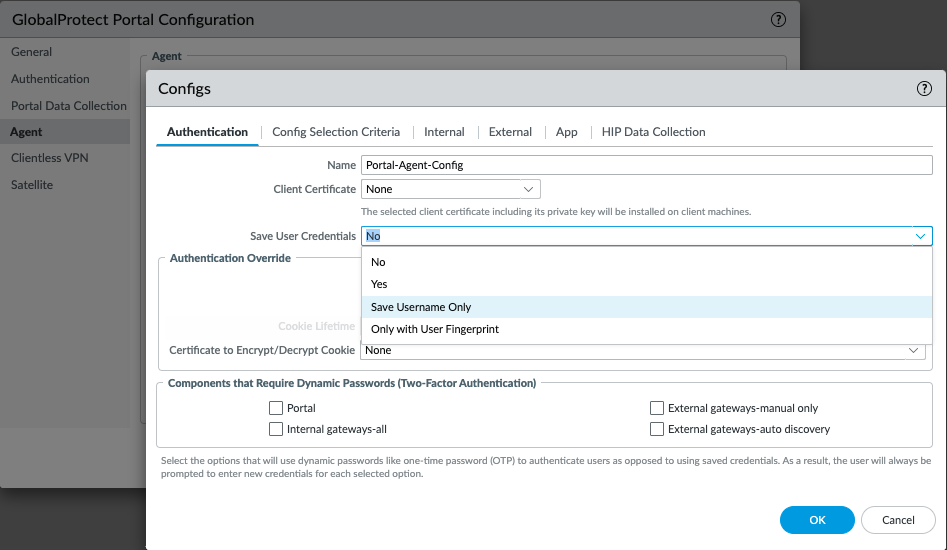
- Save User Credentials is checked in GP portal configuration.
Cause
- The new portal configuration does not take effect until it is connected successfully.
- The Portal connection is just switched from A to B, before connected to B and so the GP app still uses portal A's cached config.
Resolution
- Set "Save User Credentials" to "No" or "Save Username Only"
- Now the user is prompted for credentials when switching the portal.
GUI: Network > GlobalProtect > Portals > (portal name) > Agent > (agent name) > Authentication