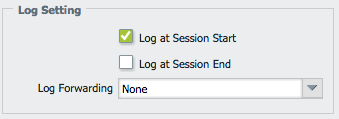
When creating a security policy, there is the option to log the session information at session start or session end and the logs will be generated accordingly.
In the example log below, the security policy is configured to log at session end. This session began at Start Time 2015/06/22 04:27:41. Generated Time is when the logger received the logged session information at the end of the session at 2015/06/22 04:32:00.
Receive Time is the logging time stamp 2015/06/21 23:27:12. This time is based on what is seen as the local Panorama time.
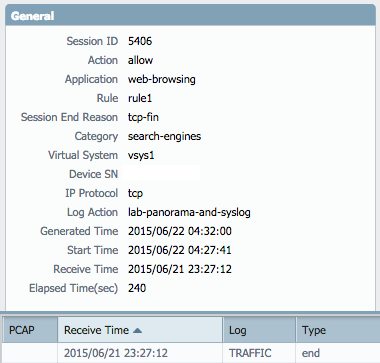
Specific information regarding the timers is provided below:
- Generated Time: This is when the log is first generated. For traffic start log, it will be at session start. For traffic end log, it is Start time + Elapsed Time. For Threat log, it is when we detect a threat (DP).
- Start Time: Session Start Time (DP)
- Receive Time: The time when the log is received by management server for log forwarding (MP). If the log is forwarded to Panorama, Panorama updates the Receive time to its local time.
- Elapsed Time (sec): This is the session duration in seconds since Start Time (measured by dataplane). Elapsed Time is a direct measurement of session duration by the Data Plane's session table and is an independent counter, not a calculated field based on Generate Time or Receive Time. Sessions with very short durations (sub-second) or those with no actual data traffic before termination or aging out will report an Elapsed Time of 0
Additionally, sessions that time out due to lack of activity (as opposed to FIN/RST) will have the session timeout added to the Elapsed time value.
Below is an example log entry of a timed-out session with a 3600 second idle timeout value set:
Session start: 22:12:04
Generated Time: 00:56:40
Elapsed time: 6276
Session Start - Generated Time = 2 hours, 44 minutes, 36 seconds (9876 seconds)
Discrepancy between Elapsed time & actual time: 3600 seconds
Based upon this example log the session went idle and timed out after 3600 seconds. So the elapsed time when the session was active was 6276 seconds. The log was generated when the session timed out.
owner: ekampling