How to Reset the Administrator Password
616274
Created On 09/25/18 20:40 PM - Last Modified 07/21/26 22:07 PM
Symptom
The administrator password is lost or forgotten.
Environment
- Palo Alto Firewall
- Any PAN-OS version
- Lost Administrator password
Resolution
Recovering the administrator password is not possible. The password must be reset by booting into maintenance mode to load a previously saved configuration for which the password is known.
- To boot into maintenance mode, connect to the console via the physical console port and use terminal software.
- Reboot the firewall and keep pressing 'm' (or 'maint' for newer versions).
- The device boots into "Maintenance mode"
- Once you enter maintenance mode, continue to the 'Select Running Config' option.
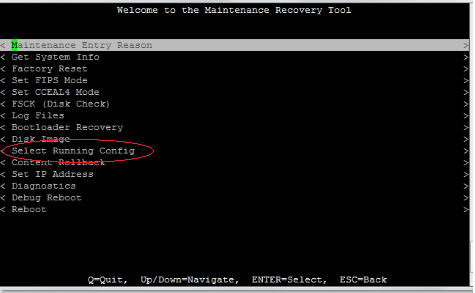
- Choose a previous version of the running-config for which the administrator password is known and then reboot the device with this config.
Note: If a previous config cannot be loaded or the password is unknown for all saved configs, the firewall will need to be factory reset in order to set a new administrator password.