Upgrading PAN-OS on HA Pair Causes Data Plane Ports on Passive Device to Go Down
Resolution
PAN-OS 5.0, 6.0
Issue
After upgrading to a PAN-OS 5.0 or a PAN-OS 6.0 release on a High Availability (HA) pair, the data plane ports on the passive device go down (status is red).
For example, upgrading from 5.0.2 to 5.0.13 will result in setting the link state to shutdown by default.
Resolution
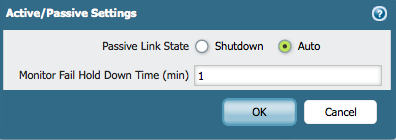
The Passive Link State option is set to "shutdown" state by default after upgrading the software code, as shown below:
After the software upgrade, the administrator has to manually change the Passive Link State option under Device > High Availability > Active/Passive Settings to Auto.
Note: There are certain features in the Palo Alto Networks firewall that set to their default values after a reboot or an upgrade. The Passive Link State is one of them.
See Also
Passive Device Interfaces Down in Auto Passive Link State
What is the Difference Between Auto and Shutdown Mode for Passive Link?
owner: tshivkumar