Overview
Log suppression, when enabled, is a feature that instructs the Palo Alto Networks device to combine multiple similar logs into a single log entry on the Monitor > Logs > Traffic, Data Filtering, or Threat page.
Clicking on the entry for the log details shows an increased Repeat Count value and the related logs associated with the entry.
This function is effective for ICMP Traffic Logs, Data Filtering Logs, and some types of Threat Logs (Spyware, Vulnerability, Wildfire-Virus, ML-Virus, Virus, Flood)
Details
Use the show system setting logging CLI command to verify the current setting:
> show system setting logging

Max. logging rate: 50000 cnt/s
Max. packet logging rate: 2560 KB/s
Traffic log generation rate: 0 cnt/s
Threat log generation rate: 0 cnt/s
Log sent rate: 50000 cnt/s
Current traffic log count: 0
Current threat log count: 0
Random traffic log drop: off
Log suppression: on
default-policy-logging: off
By default, log suppression is enabled.
Temporarily disabling log suppression:
> set system setting logging log-suppression no

Log suppression is disabled
Disabling log-suppression on running-config:
# set deviceconfig setting logging log-suppression no

[edit]

# commit
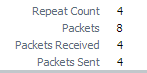
In an example scenario, ping traffic was passed through the firewall. Log suppression was enabled and 4 ping packets were sent. On the traffic logs page, there was only one entry for ping. Clicking on the entry for the details showed a Repeat Count of 4.
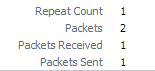
When the log suppression was disabled 6 ping packets produced 4 traffic log entries for ping. As expected, each log had a Repeat Count of 1.
owner: ssunku