When Jumbo Frames are enabled, the default MTU value settings will be 9192 bytes. The maximum supported MTU is 9216 bytes.
Note: This configuration applies to all Data Plane interfaces, including HA interfaces. To use higher MTU values for specific interfaces, the global MTU setting must be adjusted to at least the maximum MTU value required by any interface. It is critical to configure the network switch accordingly to handle these MTU settings effectively.
Details:
To enable Jumbo Frame support:
- Navigate to GUI: Device > Setup > Session in the web UI.
- Click Edit for the Session Settings section.
- Enable Jumbo Frame support and specify the Jumbo Frame MTU in this section.
- Commit the changes.
- Reboot the device for this change to take effect.
CLI command to enable jumbo frame:
> set system setting jumbo-frame on
To use Jumbo Frame support on an interface:
- Navigate to the Network tab.
- Select the appropriate interface.
- Set the MTU size for the interface, up to the size specified under Device > Setup > Session.
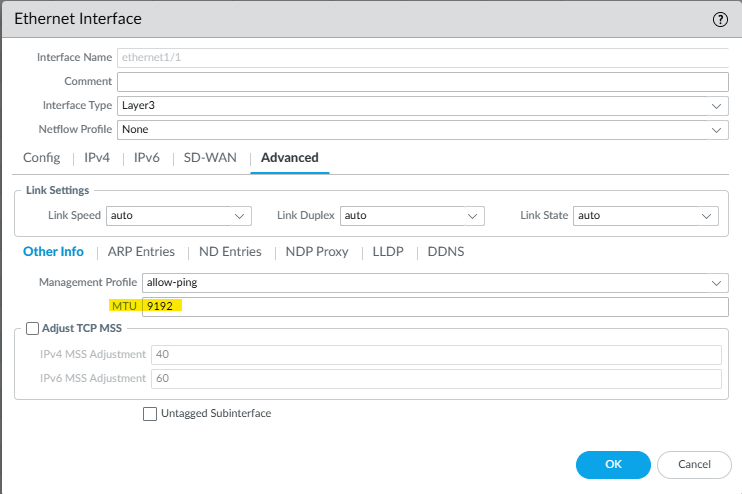
- Commit the changes.
To disable Jumbo Frame support:
- Uncheck Jumbo frame support from Web UI via Device > Setup > Session > Session Settings.
- If applicable, adjust the MTU size on interfaces that were configured for Jumbo Frame support.
- Commit the changes and reboot the device.
CLI command to disable jumbo frame:
> set system setting jumbo-frame off
To check if the device is enabled for Jumbo Frame support:
- Check ‘Jumbo frame support’ setting from Web UI via Device -> Setup -> Session -> Session Settings.
CLI command to check jumbo frame:
> show system setting jumbo-frame
Device Jumbo-Frame mode: on
Maximum of frame size excluding Ethernet header: 9192
- To view the Jumbo Frame setting at an interface level, use the following CLI command:
> show system state filter-pretty sw.dev.interface.config

sw.dev.interface.config: {
  ethernet1/3: {
    hwaddr: 00:1b:17:89:94:12,
    mtu: 9192,
  },
  ethernet1/4: {
    hwaddr: 00:1b:17:89:94:13,
    mtu: 9192,
  },
  ethernet1/7: {
    hwaddr: 00:1b:17:89:94:16,
    mtu: 1500,
  },
  ethernet1/8: {
    hwaddr: 00:1b:17:89:94:17,
    mtu: 1500,
  },
}
3. Jumbo frame mode can also be checked using the following CLI command:
> show system state filter-pretty cfg.jumbo-mode
cfg.jumbo-mode: True