When configuring SSL decryption policy in order to define SSL traffic eligible for decryption, you have to make a choice between 2 different types/modes:
- SSL Forward-Proxy
- SSL Inbound Inspection
This article explains the difference between the two modes.
Forward-Proxy
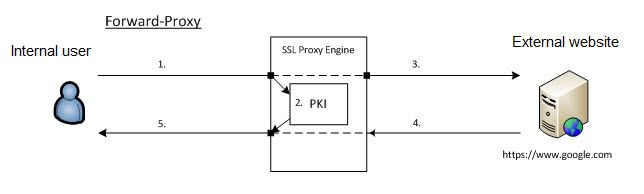 SSL Forward Proxy showing an Internal user going to an External SSL site.
In Forward-Proxy mode, PAN-OS will intercept the SSL traffic which is matching the policy and will be acting as a proxy (MITM) generating a new certificate for the accessed URL. This new certificate will be presented during SSL Handshake to the client accessing website with SSL. This certificate will be signed with the self-signed CA certificate or another certificate specified as:
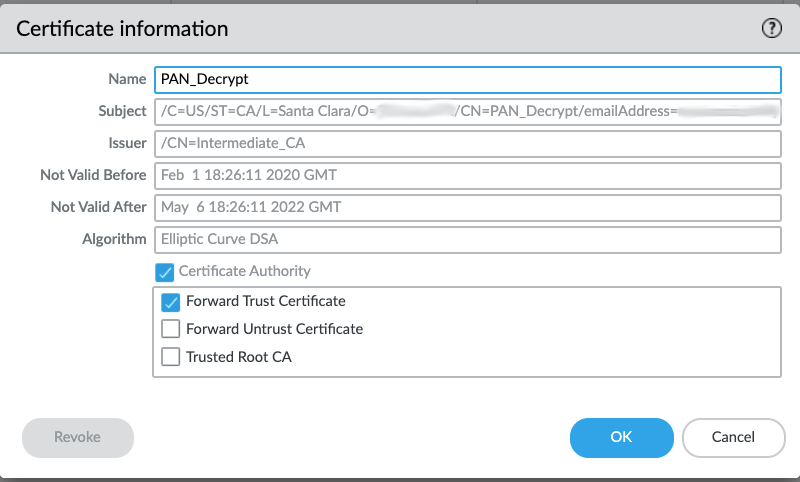
Note: If you want to use a certificate issued by third party, it needs to be a CA certificate and you will have to import public AND private key (Key Pair).
A separate certificate needs to be created to present to the Client when the Server Certificate signer is not trusted.
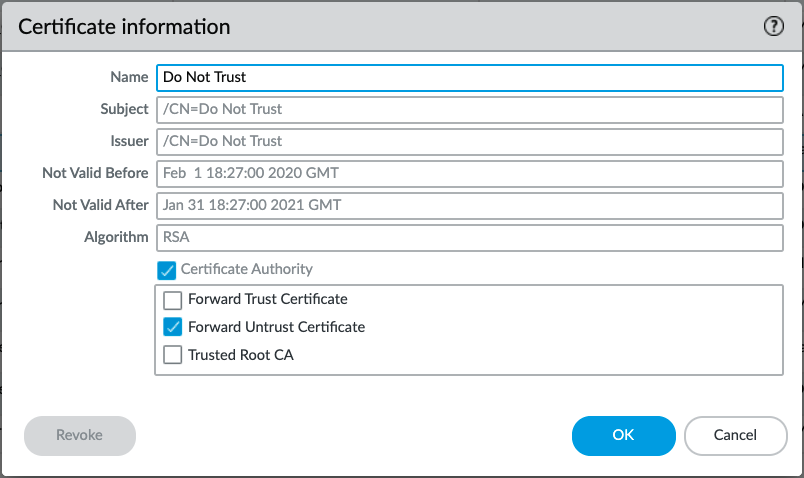
Note: The Forward Trust and Forward Untrust certificates must be different certificates. If the same certificate is configured for both, clients behind the firewall would trust every certificate presented by the firewall, including certificates for websites with invalid, expired, or untrusted server certificates. This defeats the purpose of certificate validation and creates a significant security risk.
- An internal user initiates an HTTPS connection to a website (for example, https://www.google.com). the traffic matches an SSL Forward Proxy decryption policy.
- The firewall intercepts the connection and acts as a trusted intermediary (proxy) between the client and the destination web server.
- PAN-OS establishes a separate SSL/TLS connection to the destination web server and performs the SSL/TLS handshake to validate the server's certificate.
- If the server certificate is valid and trusted, the firewall dynamically generates a certificate for www.google.com, signed by the configured Forward Trust CA certificate. If the server certificate is invalid or untrusted, the firewall signs the generated certificate using the configured Forward Untrust CA certificate.
- The firewall presents the generated certificate to the client in the Server Hello message and completes a separate SSL/TLS handshake with the client.
- Once both SSL/TLS sessions are established, the firewall decrypts the traffic, inspects it using security features such as Threat Prevention, URL Filtering, Antivirus, WildFire, File Blocking, and Data Filtering, then re-encrypts the traffic before forwarding it to the destination server.
Key Concept
SSL Forward Proxy creates two independent encrypted connections:
Client ↔ PAN-OS Firewall
PAN-OS Firewall ↔ Web Server
The firewall decrypts and inspects the traffic between these two connections, then securely re-encrypts it before forwarding it. This allows full visibility into encrypted traffic while maintaining secure communication between both endpoints.
Inbound Inspection
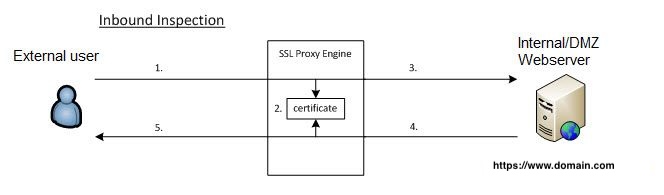
Inbound inspection showing when an external user comes into a webserver internally or in a DMZ.
In Inbound Inspection mode, PAN-OS will not act as a proxy with SSL traffic matching the policy. PAN-OS will try to decrypt this SSL traffic 'on-the-fly' by eavesdropping the SSL handshake and using associated Certificate (Key Pair) configured in decryption policy as below:
Note: Starting with PAN-OS 10.1, all inbound decrypted sessions are processed via proxy (firewall is MITM); There is no “transparent” processing for RSA key exchange. Refer to the SSL Inbound Inspection documentation.
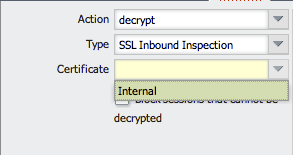
Note: SSL Inbound Inspection can only decrypt traffic if you own and manage the web server's certificate and private key. The firewall must have the server's certificate and private key (key pair) imported so it can decrypt incoming SSL/TLS sessions. For this reason, SSL Inbound Inspection is typically used to inspect traffic destined for internal web servers.
- An external client initiates an HTTPS connection to an internal web server (for example, https://www.domain.com). The traffic matches an SSL Inbound Inspection policy.
- The firewall uses the imported server certificate and private key to prepare for decryption. Unlike SSL Forward Proxy, the firewall does not terminate or proxy the client's SSL/TLS session.
- The SSL/TLS handshake continues directly between the client and the internal web server, while the firewall passively monitors the handshake.
- During the Server Hello phase, PAN-OS verifies that the certificate presented by the web server matches the certificate whose private key was imported into the firewall.
- If the certificates match, the firewall uses the imported private key to decrypt, inspect, and re-encrypt the traffic transparently for the remainder of the session. If the certificates do not match, decryption cannot be performed, and the session continues encrypted while the firewall records decryption failure counters for troubleshooting.
See also
SSL decryption resource list
The SSL decryption resource list has a long list of articles dealing with SSL decryption only.
owner: nbilly