Server and Client Logging for Traps
Symptom
The Traps logs can be referenced to provide a deeper understanding of the system and the issues that are encountered.
Resolution
Details
On the ESMServer, the Traps's logs (Core log - Server.log ,Console log - DebugWeb.log) are located at:
C:\ProgramData\Cyvera\Logs
On the Traps client machine:
Service.log
- Windows Vista and above
C:\ProgramData\Cyvera\Logs - Windows XP
C:\Document and Settings\All Users\Application Data\Cyvera\Logs
Console.log
- Windows Vista and above
C:\Users\<USERNAME>\AppData\Roaming\Cyvera - Windows XP
C:\Document and Settings\<USERNAME>\Application Data\Cyvera\Logs
Log analysis
There are few ways to search for issues in the Traps logs.
- Search the logs for keywords.
The following words point to and describe their severity:- TRACE
- DEBUG
- INFO
- WARN
- ERROR << found in most cases
- FATAL
- Search the problem in the log by looking for any change in the order of the notifications:
Known log entries on Traps (Service.log)
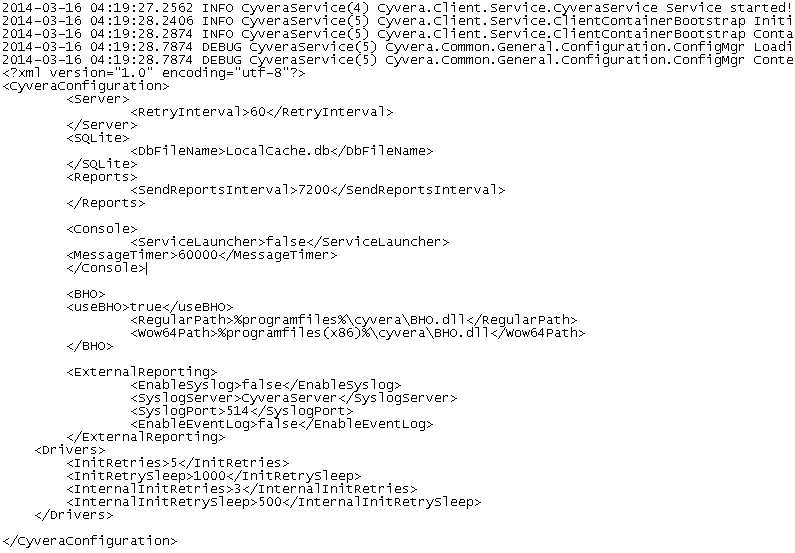
Starting service
Keywords: "CyveraService service started"
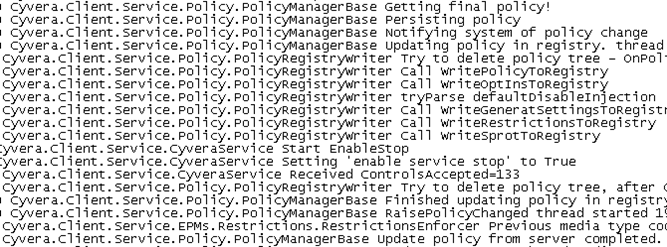
Policy updated
Keywords: "update policy"
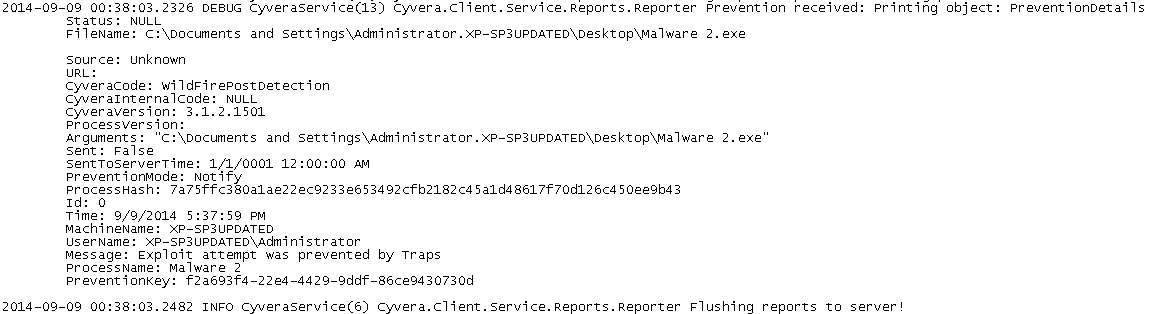
Prevention log
Keywords: "prevention received"
One time action log
Keywords: "Executing one time actionParameters"

Process flow
Keywords: "ProcessNotification called"
WildFire check
Keywords: "wildfire.wildfire Hash"

No connection to server
Keywords: "Failed contacting server"

Known log entries on ESM Server (Server.log)
Starting service
Keywords: "Starting Service"
Updating client policy
Keywords: "GetPolicyFinal"

Heartbeat from client
Keywords: "Heartbeat call from machine"
Getting prevention from client
Keywords: "prevention"

Action done
Keywords "ReportImmidiateActionDone"
Wildfire hash inspection
Keywords: "wildfire result for hash"

No connection to DB

No connection to Wildfire
