How to Redistribute a Static Route and Connected Routes into RIP
0
Created On 09/25/18 17:46 PM - Last Modified 07/19/22 21:58 PM
Resolution
Overview
This document describes how to redistribute a static route into RIP on the Palo Alto Networks firewall.
Steps
- From the WebGUI, go to Network > Virtual router and click "default". Then create a redistribution profile as shown below:
- Configure the profile name and enter Priority. Check the Redist option for Redistribute. Go to General Filter and select the filter type as static and connected
Click "OK"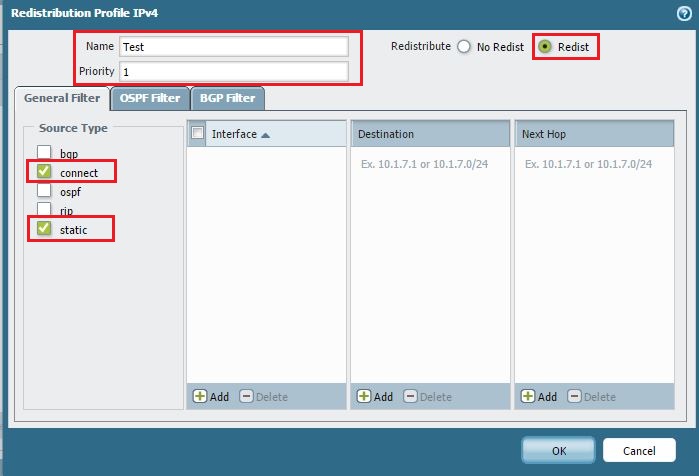
- Create an Export Rule under RIP router configuration.
- Add the Redistribution Profile and click "OK". Then commit.
Note: If there is a default route to redistribute, enable the "Allow Redistribute Default Route" option.
See Also
owner: sbabu