How to enable/disable Rediscover Network (i.e. Refresh Connection) option on GlobalProtect App?
35134
Created On 04/15/20 03:23 AM - Last Modified 03/11/26 03:33 AM
Objective
How to enable/disable the Rediscover Network (i.e. Refresh Connection) option on the GlobalProtect App?
Environment
- Windows OS
- MacOS
- GlobalProtect App 5.0 and above
- Enable Rediscover Network Option
Procedure
- Enable Rediscover Network Option is set to Yes by default.
- When it is set to Yes, on GP Portal, the Refresh connection is displayed under GlobalProtect App.
GUI: Network > GlobalProtect > Portals > (portal-config) > Agent > (agent-config) > App
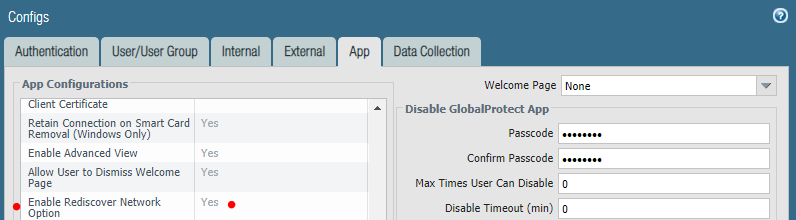
GlobalProtect App/Agent Behavior:
- When Enable Rediscover Network option is set to No, on GP Portal, the Refresh connection is not displayed under GlobalProtect App.
GUI: Network > GlobalProtect > Portals > (portal-config) > Agent > (agent-config) > App
GlobalProtect App/Agent Behavior